Thursday, December 8, 2011

The Web is on life support: Forrester Research

December 8, 2011, 7:22 AM

LeWeb11
Forrester Research’s Chairman and CEO George Colony told a room full of Web and social-media enthusiasts Thursday in Paris that they were living on borrowed time.
Colony said that several models of thinking about the Web/Internet space are dead or outmoded.
Colony distinguished between the Web, which he said is a software architecture, and the Internet, which is a larger organizing framework.
He said technology is migrating away from the PC/Desktop model, as well as what he called the Web cloud.
Colony asked LeWeb attendees to consider “what we will hold in our hands 5 years from now.”
Forrester Research thinks the answer to that question is the so-called App Internet, which offers a “faster, simpler and better Internet experience.”
The App Internet market is worth $2.2 billion, according to Forrester Research.
And decision makers at 41% of companies are now moving away from Web-based software toward the App Internet, Colony said.
He also said that Google, whose products are heavily invested in the Web/Internet space, “are wishing they could stop the world right now.”
“They love the web, that’s how they make money,” Colony said.
Still, “every 10 years there’s a vendor that we think is dead that comes back,” Colony said.
In the 1980s it was Intel; in the 1990s, IBM; in 2000, Apple; and going forward Colony said it could be Microsoft, led by their gaming initiatives.
Although he said that would likely require a generational leadership change from the Windows software maker.
Colony said that three companies could emerge as true leaders in the App Internet sector:  Apple, Google (around their Android platform) and Amazon.
He also said that adoption of social media in urban areas was now extremely high and “running out of hours and people.”
Declaring, in effect, that we are socially saturated.
That means “we are in a bubble,” he said, adding that a post-social world was on its way that would “sweep away some of the nonsense like Foursquare.”
A new era of more efficient social enterprise is drawing near, he said.
“Social will thrive but in an evolved form.”

Wednesday, December 7, 2011

IT Security War Will Be Won or Lost at the Endpoint

Posted by Michael Vizard Dec 5, 2011 12:34:14 PM

The State of Endpoint Security
The amount of time IT organizations are spending on security issues is starting to have a significant impact the rest of IT operations.

The battle between good and evil in terms of security is starting to shift locations. Instead of being primarily focused on the network perimeter, it’s starting to become clear that the new definition of the network perimeter involves the client device.

Unfortunately, a new study of 688 IT security professionals in the U.S. conducted by the Ponemon Institute on behalf of Lumension Security, a provider of endpoint management and security software, shows that IT organizations are losing that battle. The reason for this, says Ed Brice, Lumension senior vice president for worldwide marketing, is that with the advent of mobile computing, removable media devices such as USB drives and a host of new applications that run on those devices, IT organizations are falling behind when it comes to investing in technologies such as application control and mobile device management.

Alas, the survey finds that the bulk of the IT security budget is still being applied mainly to firewalls and anti-virus software running on traditional PC devices. The end result, says Brice, is that when it comes to mobile device security, IT organizations are falling further behind.

The good news is that the survey says that IT security professionals clearly identify mobile devices, removable media and third-party applications as the biggest risks to their organizations. But less than half of those surveyed said they have the “ample resources” they need to minimize endpoint risks, which goes a long way to explaining why future investments in IT security are still fairly limited to a narrow range of technologies even as security technologies continue to get more robust and sophisticated.

In the meantime, the survey makes it clear that many IT organizations are seeing an increase in the number of attacks, which manifests itself in the fact that 41 percent of those surveyed said their networks were less secure than they were a year ago. Hopefully, that fear will be enough to motivate IT organizations to re-evaluate their IT security strategies for 2012 at a time when the very nature of enterprise computing has never been more dynamic or difficult to manage.

Monday, December 5, 2011

Preparing For The Real Costs Of Cloud Computing

By Bob Violino
December 5, 2011 06:00 AM ET

Computerworld - Most experts agree: The cloud is moving past the hype stage and starting to deliver tangible benefits, primarily increased flexibility and agility.
But moving to the cloud can also mean added costs, some of which are unexpected, according to IT executives whose organizations have implemented or are considering cloud services.
While these costs wouldn't necessarily prevent companies from getting real business value out of cloud computing, they could have an impact on the overall cost-benefit analysis of cloud services.

Moving and Storing Data

It can cost tens of thousands of dollars per year to move large volumes of data to public cloud services and to store that data for long periods of time. Many companies might not be aware of the expenses involved.
"A one-time move can [cost] thousands of dollars," says Hernan Alvarez, senior director of IT and operations at WhitePages Inc., a Seattle-based company that provides online contact information for more than 200 million people and 15 million businesses.
Network bandwidth accounts for much of the cost of moving data: Cloud providers might charge upload and download fees. And even though data and systems are being hosted off-site, there are internal labor costs. "People think there are no labor costs [with the cloud], but as you scale up [to] handle workload, there's a complexity with managing large numbers of cloud instances, just like managing a large number of servers," Alvarez says. Another big cost is for long-term data storage in the cloud. "When you consider the data growth rates over the next three years, the life-cycle cost of data can be really high," Alvarez says. "You continue to pay for that every month" when data is stored in the cloud.
But these costs are "only unexpected if you don't fully comprehend the cloud model," he says. "If you think about CPUs, capacity and storage [needs] and chart that over time, you can get a pretty good handle on what the costs are and if you can do it more cost-effectively internally."
WhitePages considered using the cloud for data backup, but after extensively evaluating eight vendors, the company determined it would be too expensive -- as much as three to four times what it would cost to keep data internally, Alvarez says. So the company opted to handle long-term data storage on-site, in its private cloud.
In general, though, using public cloud computing for purposes other than storage eliminates the need to deploy and maintain applications internally. WhitePages has been using public cloud services for about two years and now uses 11 cloud-based applications from Salesforce.com, SuccessFactors, ADP, WebEx, Yammer and other providers. This has led to savings that greatly outweigh any of the unexpected costs, Alvarez says


Integrating Apps From Multiple Vendors


Pacific Coast Building Products wants to start using cloud computing in a big way and has evaluated services from several vendors. But the Rancho Cordova, Calif.-based provider of goods and services to the construction industry has limited its cloud usage so far because the economics are not quite there yet, says CIO Mike O'Dell.
Two reasons for this are the difficulty of integrating software from disparate vendors in the cloud, and the fact that Pacific Coast would incur added costs if it tried to handle the integration on its own.
For example, the company uses Microsoft Exchange for email and Cisco's Unity Unified Messaging for voice mail, and it's interested in using both of those applications as cloud services. "Integration between [Exchange and Unity] in the cloud, at least the last time we looked, wasn't there," O'Dell says.
Without integration, users wouldn't have some of the capabilities they have now, such as automatic deletion of voice-mail messages on their phones when they receive the messages via email.
The same sorts of integration challenges exist with larger and more complex applications, such as ERP, O'Dell says.
For example, "for us to put [SAP] in the cloud means we'd have to give up features or spend a lot of money on integration," he says. "Maybe it's just a matter of immature technology, but the integration side is where the hidden costs are. If you don't look at this right out of the gate, you might not be as happy with the economics at the end as you thought you would be."

Testing Software

The need to test software before migrating to the cloud can also result in unforeseen costs.
"We bumped into some expense that we did not expect for testing and debugging a vendor app that had not been run in a cloud configuration before," says Bill Thirsk, vice president of IT and CIO at Marist College in Poughkeepsie, N.Y.
The college was moving a large-scale ERP system onto a private cloud, using servers that the vendor hadn't yet approved. Marist uses its private cloud to provide online services such as registration, billing inquiries and payments to students, faculty and research organizations.
Thirsk says "99%" of the college's ERP migration activities "went very smoothly, and overall we saved hundreds of thousands of dollars by using a cloud configuration." But, he adds, "stabilizing the system within a cloud that already supported 900 virtualized servers gave us quite a challenge."
The added expense was to "untangle the maze of what versions [of] the operating systems and databases would work," Thirsk says. "It was [a] matter of changing some code. It took some time and effort to figure out exactly what lines needed to be changed."

Hidden costs can also crop up if applications aren't primed to take full advantage of the capabilities of cloud computing.
"We made the assumption that the ERP programming was sophisticated enough to take advantage of all the processors, memory, caches, storage devices and network connections that the cloud configuration offered," Thirsk says. But it wasn't, and revising the software code required a "considerable amount" of application developer and systems programmer time. "We have seen a 30% increase in performance, but it wasn't free," he says.

Rent and Utilities

IT executives who move systems to the cloud might encounter another unexpected cost if they suddenly find themselves paying expenses that wouldn't normally be their responsibility.
"There are, of course, many costs associated with hosting a system internally, but not all of them, like power and rent, are paid out of my IT budget," says Jonathan Alboum, CIO at the U.S. Department of Agriculture's Food and Nutrition Service (FNS). "With the cloud, these basic infrastructure charges are baked into the overall cost, so I'm now paying for some things that previously didn't come out of my IT budget."
Since the summer of 2010, the FNS has been using an Amazon.com cloud service to host an application that's offered through the agency's Supplemental Nutrition Assistance Program (SNAP), which provides the benefits that used to be known as food stamps.
The tool, called the SNAP Retailer Locator, provides an online map that helps people find retailers that accept SNAP debit cards. The FNS decided to put the application in the cloud because that setup allowed for a quick launch and was highly scalable, among other reasons.
Since he's using a cloud-based service, Alboum has to pay new monthly costs and take a new approach to budgeting. "Overall, [the cloud] is very manageable and likely results in overall lower costs for the government," he says. "But it is different from what we've traditionally experienced."
It's not a matter of the cloud service costing more than in-house hosting. "I think of this as a cash-flow issue," Alboum explains. "If I'm going to pay monthly costs, I need to have available budget to cover those costs at the time I incur them. In the more traditional model, I would purchase hardware and associated services in a lump sum. The new model is likely less expensive, but requires a change to budgeting practices."
Much about the cloud is still relatively new, and experts say organizations evaluating cloud services need to look at both the costs and potential benefits. In a report on cloud services in April 2011, Gartner noted that IT executives "should take steps to manage inherent risks and unexpected costs during the cloud services revolution."
The cloud model is "immature and fraught with potential hazards," says Gartner analyst Frank Ridder. "Cloud computing is driving discontinuity that introduces exciting opportunities and costly challenges. Organizations need to understand these changes and develop realistic cloud sourcing strategies and contracts that can reduce risk."
The cloud sourcing life cycle includes four main elements: sourcing strategy, vendor selection, contracting, and management and governance, says Ridder, adding, "The life cycle is a critical area to plan and manage, regardless of whether organizations source their IT services through internal or external resources."

Friday, October 28, 2011

Friday, October 21, 2011

VMware, Verizon Partner for Upcoming 'Dual-Identity' Smartphone
http://ping.fm/aGvRu

Wednesday, October 12, 2011

How to upgrade your iOS device to iOS 5


Apple’s latest iOS has arrived; here’s how to get it on your iPhone, iPad, or iPod touch

iOS 5 has hit the stage, and eager users everywhere are getting ready to upgrade their devices. If you’re concerned about the upgrade process, or simply want to know all your setup options before making the big switch, let us help you upgrade your iPhone, iPod touch, or iPad to iOS 5 with this step-by-step guide.

What devices will run iOS 5?

Before we get into the upgrade process itself, you’ll want to make sure you actually have a compatible device. Because of new features and enhanced graphical animations, iOS 5 may require more processing power than your device offers; as such, Apple has limited the operating system to the following models:
iPhone models: iPhone 3GS, iPhone 4, iPhone 4S

iPad models: iPad (no support for Multitasking Gestures, though), iPad 2

iPod touch models: iPod touch (third generation), iPod touch (fourth generation)

If you have an original iPhone, iPhone 3G, or first- or second-generation iPod touch, you’ll have to stick with your current version of iOS. (Which, if you remember some of the hullabaloo over the iPhone 3G running iOS 4, may be the better option.)

Ready, set, prep

Now that you’ve double-checked that your device is capable of running iOS 5, here’s what you need to upgrade: your iPhone, iPod touch, or iPad; your computer; and the latest version of iTunes. (If you don’t have it, you can download it from Apple’s website.)
Macworld also suggests that you make a backup of your device before proceeding: If you’re doing a straight update, a backup prevents you from losing any data in case something goes wonky down the line; if you’re doing a full restore of your device before you install iOS 5, you’ll need a recent backup to recover your information.
To make a backup, connect your device to your computer via USB, open iTunes, select your device, and press the Sync button. This should automatically update your iTunes backup with any extra relavent information. If your device is already plugged into you computer, you can also control-click on the device in the iTunes Source List and select Back Up from the subsequent drop-down menu.

Update your device

In theory, when you open iTunes with a compatible device connected, you’ll be prompted to download iOS 5. In practice, this may not appear automatically—the update may not have automatically propagated to the server your copy of iTunes checks with, or iTunes may have hiccupped. But never fear: You can force iTunes to check for an update by clicking on the Check For Update button in the Summary pane for your device.

Assuming that everything is working properly, iOS 5 should begin downloading from the iTunes server to your computer. You can do other tasks while waiting for the download to finish; once it does, your device will restart and begin installing the software.
If you’d like to restore your device—that is, do a fresh install of iOS 5 and then re-upload your backed up settings—you’ll want to click the Restore button instead of Check For Update. You’ll download iOS 5, like above, but instead of doing a direct update from iOS 4 to iOS 5, your device will restore itself to factory settings before installing the new OS.

The post-PC walkthrough


Once you update to iOS 5, you have to run through a short series of steps to get your device up and running.

Unlike previous iOS upgrades, once the software finishes installing, you can activate and set everything up directly on the device itself—no computer intervention necessary. (Any subsequent iOS updates can even be done over-the-air, as mentioned later in this article.)
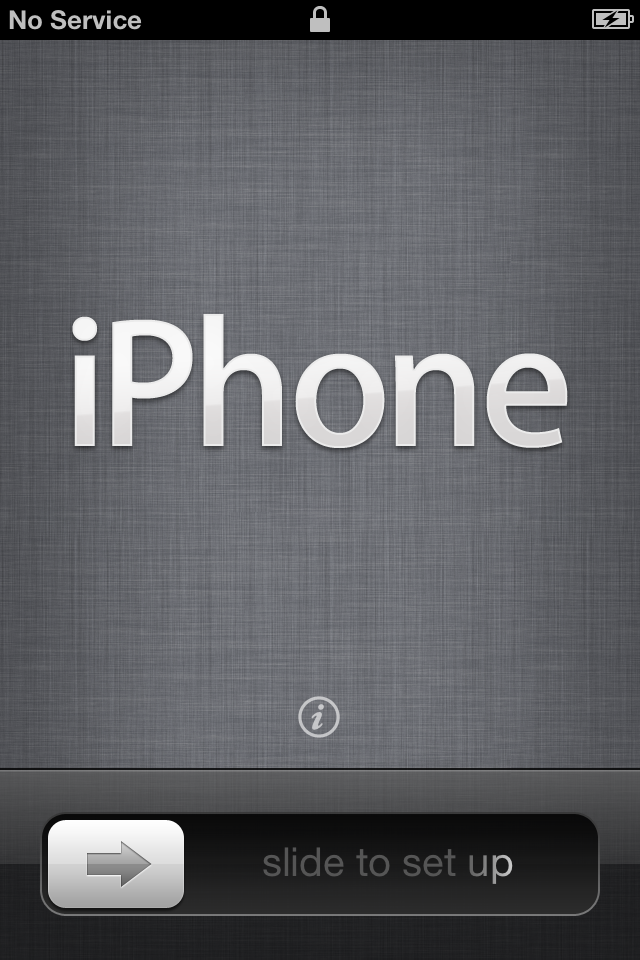
Once the update finishes installing, you’re greeted with a welcome screen displaying the message “Slide to set up” in a variety of different languages. (If you need quick access to your device’s IMEI or ICCID number without finishing the setup, you can tap the information button located directly above the slider.)
To begin the setup process, you’re asked if you’d like to enable Location Services. This allows Apple apps (and third-party apps) to access your location via Wi-Fi networks and your GPS (Global Positioning System) location.
Following that, your device will check for any Wi-Fi networks in the area for you to connect to; if there aren’t any, or if you’re on an iPhone or 3G-enabled iPad and would rather use your cellular service, just tap the Next button.

Did you restore your device?


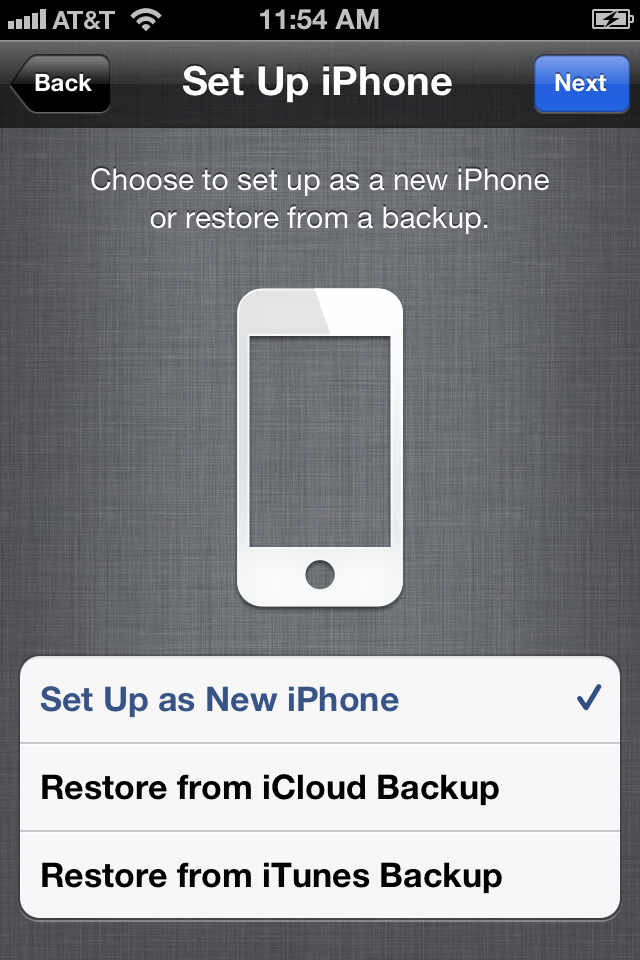
You can set up your device from scratch, or restore it from a backup.

If you’re updating from a clean slate, you’ll need to decide whether you want to set your device up from scratch, restore it from an iCloud backup, or restore from an iTunes backup. (If you're updating from iOS 4, you can ignore this section.)
Chances are—unless you’re a developer—that if you’re updating to iOS 5 on launch day, you haven’t used iCloud’s Backup feature to keep a copy of your device’s settings. And, since iOS 4 devices can’t even back up to iCloud, the only way you could use this feature would be to restore your device using the backup of another device currently running iOS 5.
All that said, if you have an iCloud account, have made a backup of a different iOS 5-enabled device, and want to restore this image to your current device, you can do so by tapping Restore From iCloud Backup. Sign into your account, agree to Apple’s terms and conditions, then choose which backup file you’d like to use, and tap the blue Restore button in the top right corner of the screen. (Depending on the speed of your Wi-Fi connection, this process can take anywhere from a few minutes to a few hours.)
More likely, you’ll want to restore from the iTunes backup you made before downloading iOS 5. (You did make a backup, right?) To do so, tap Restore From iTunes Backup, and you’ll be brought to the Connect to iTunes screen. Assuming you’ve stayed connected to your computer, just open iTunes (if you haven’t, re-connect your device). After selecting your device, you’ll see the Set Up Your Device screen, which asks if you’d like to set it up from scratch or restore from a specific backup. Choose restore, select the latest backup from the drop-down menu, and click the Continue button to proceed. (This process is significantly faster than an iCloud restore, as you’re transferring data over USB, rather than via Wi-Fi.)

Associate an Apple ID


Your Apple ID is an email address: one you already use, or a new email you create on the spot.

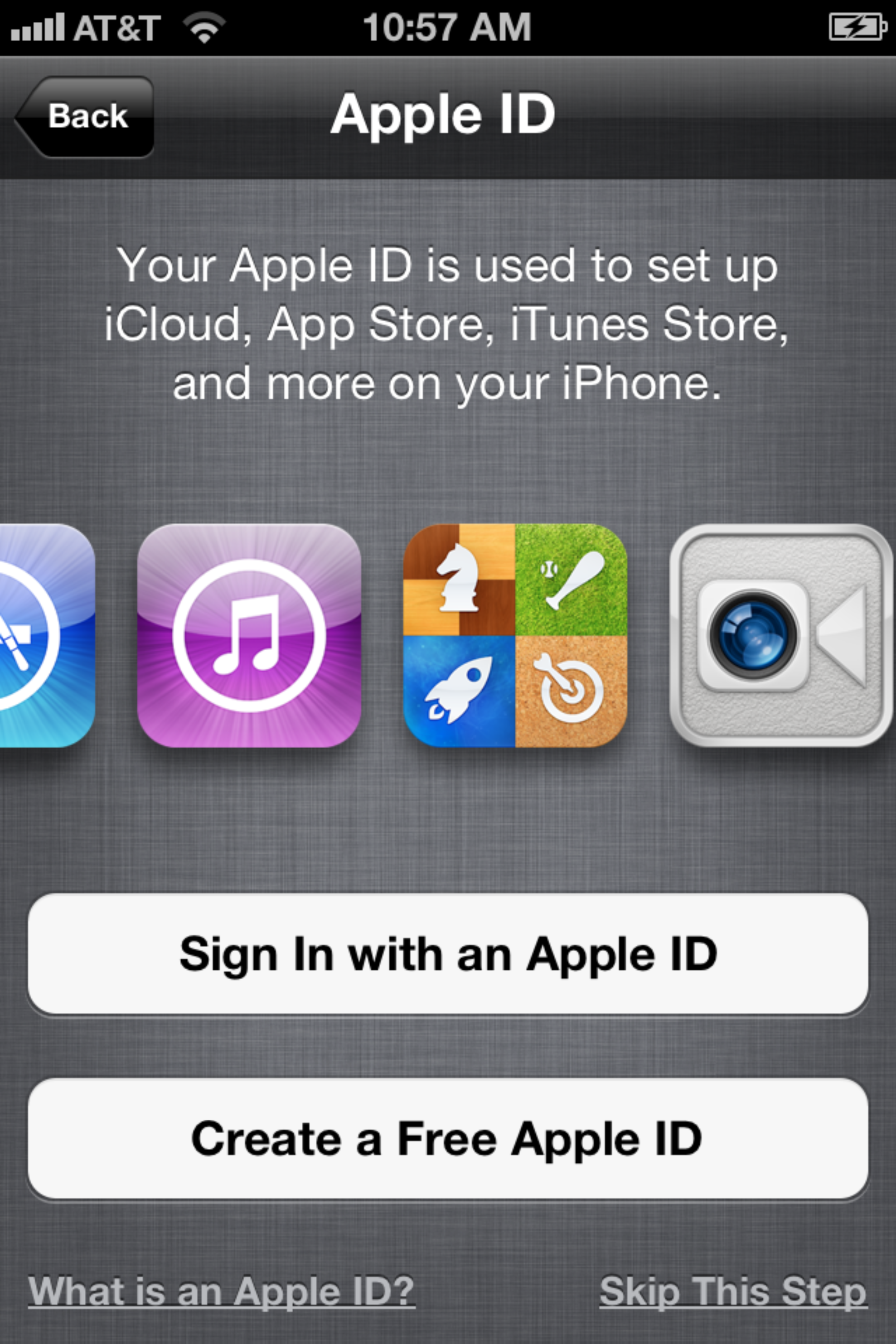
Before continuing your setup—whether you’re setting up your device from scratch or doing a simple upgrade—you need to decide if you’re going to associate your Apple ID with this device. You’ll use your Apple ID to buy music, apps, books from the iBookstore, and associate it with iCloud (if you choose to).
What’s an Apple ID?: If you’ve ever purchased something from the iTunes Store, you’ll have signed up for an Apple ID—it’s usually your primary email address. Your login information for Apple’s MobileMe or iCloud service should also work when signing in.
Use your current Apple ID: Already have an Apple ID? Tap the Sign In With An Apple ID button and enter your username (usually your email address) and password. Apple will then spend a few moments linking your device to your Apple ID.
Sign up for a new Apple ID: If you don’t have an Apple ID, it’s easy enough to create one by tapping the Create A Free Apple ID button. You’ll need to enter your birthday, name, your email address (or create a new iCloud email address), a password, a security question (in case you forget your password), and whether you’d like to receive email updates from Apple.
No Apple ID for me: If you’d rather not set up an Apple ID, you can tap the Skip This Step link in the lower right corner. You can always add or create one from the Settings app later, but note that you won’t be able to buy anything on the iTunes Store or set up iCloud until you do.

To the cloud… and beyond


If you want to keep your iPhone 4S in sync with your computer and other iOS devices, back it up remotely, and find it when it’s been lost, you can enable iCloud.

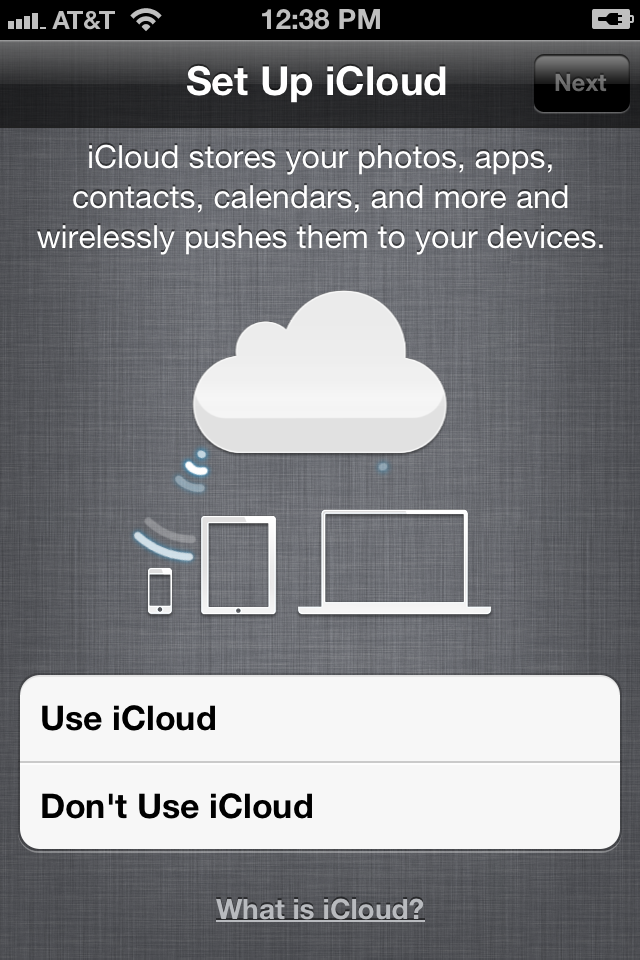
If you’ve chosen to set up or register an Apple ID, you can also enable iCloud on your device. iCloud is an umbrella term for Apple’s collection of sync services, and allows you to sync your photos, apps, contacts, calendars, and mail across multiple devices.
Choose to set up iCloud, and you’ll first be asked whether you’d like to enable iCloud backups for your device. If you do so, you can have your device back up all essential settings to your iCloud account; if you ever need to restore, you can do so over Wi-Fi without an additional computer. You can also elect to have your device back up to your computer using iTunes. Additionally, you’ll be asked whether you’d like to opt-in to iCloud’s Find My device service. This will enable location monitoring for your device, allowing you to find it using your Apple ID and the Find My iPhone app, should it go missing.
Once you finish the setup process, you’ll be asked if you’d like to send Apple anonymous diagnostics and usage information (similar to a desktop crash report). And with that, congratulations! You’re ready to begin using iOS 5.

The future of iOS updates

This may be the last time you have to go through iTunes to update your iOS device, thanks to iOS 5’s new Software Update feature. With it, you’ll be able to download all future software updates over-the-air.
Install updates on your device: If you’ve ever used an iOS device before, you’re probably fairly familiar with the process of downloading app updates from the App Store app: When a little red badge appears in the upper right corner of the App Store icon, you open the App Store, navigate to the Updates tab, and download your app updates all at once, or one by one. The Software Update process for iOS 5 is remarkably similar; but instead of going to the App Store, you go to the Settings app for any system updates.
Like the App Store, your device perpetually checks for new software updates in the background. When one is available, you see a red badge appear on the Settings app; to download it, open the app and navigate to General -> Software Update. There, you see some brief information about the update and a button to install it. You can also force the system to check for an update by navigating to the Software Update pane.
Because these iOS updates are “delta updates” (they contain only the parts of the system that have changed, so you don’t have to download the entire system each time there is an update), they’re smaller; therefore, you can download them just about anywhere you have a decent 3G or Wi-Fi connection—on the bus, at home, walking down the street, you name it. To install these updates, however, you need to have at least 50 percent battery life on your device, or have it plugged into a power source.
And just as a friendly reminder: Even though you can install these updates anywhere, you should always (always, always) back up your device before you do. You can use Wi-Fi Sync to back up to your computer, or, if you have iCloud Backup enabled, you can use that.
Install Updates from Your Computer: Maybe you’re not that adventurous, and you’d prefer to install your software update the old-fashioned way. No problem: Just connect your device to your computer and check for updates in iTunes. (If you’re using Wi-Fi Sync, you can also do this by plugging your device into a power source and connecting it and your computer to the same Wi-Fi network, and then opening iTunes.)
Latest rumor says that Apple iOS5 will Release at 10am Pacific/ 1pm EST/ 6pm GMT - That means one hour to go...

Wednesday, October 5, 2011

The Real Reason There's No iPhone 5: The Carriers

In retrospect, it shouldn't be a surprise that Apple released a half-step iPhone this week, instead of a revolutionary and redesigned iPhone 5. Think about it--the real reason for the iPhone 4S is the same as for the iPhone 3GS: carrier contracts are two years long.
The 4S isn't meant to be an upgrade for iPhone 4 users--it's a lure to get new iPhone users in the door, and you iPhone 4 folks will get your iPhone 5 upgrade just in time for a new contract. And if you decide you can't wait and spend big bucks to break your contract or buy the iPhone 4S at full price...well, that was your choice, wasn't it?

Is the most amazing iPhone yet good enough?
(Credit: Apple.com)
Look back at Apple's iPhone release history and you'll see that the iPhone 4S is just the next step in the product evolution, which went from 3G to 3GS to 4, and now to 4S. It actually makes perfect sense, once the lust for new technology and new Apple hardware starts to subside. If anything, Apple is playing a very clever shell game with carrier contracts that allows it to grab new buyers every year instead of every two years.
  Molly polled her Twitter brigade after the announcement, asking them whether the iPhone 4 users in the audience would upgrade to the iPhone 4S. The vast majority of iPhone 4 users said no, and the main reason they cited was their contracts. Examples:

@mollywood No way. Vain nerds (me) don't care about behind the scenes improvements, and siri isn't cool enough to warrant contract breakage.

@mollywood I won't. I still have 1 year on my contract, so I'll wait for the next iPhone to "wow" me. The 4GS isn't impressive, IMO.

@mollywood it's a no for me Molly. I didn't upgrade from 3G to 3GS for the same reason - nothing to justify the ETF [early termination fee]
That was a pretty standard set of responses from the iPhone 4 set and no surprise, really. (A few said they'd get it no matter what, out of sheer Apple love, but that's to be expected.) On the other hand, here are some responses from 3G owners:

@mollywood iPhone 3GS owner definitely upgrading to an iPhone 4S

@mollywood I am buying, though upgrading from a 3GS, so the reason is pretty obvious. Always wait for the refined product!

@mollywood yes. Wife's 3GS done. She gets my 4, I get 4S
Think about the staggering for a second here and you'll see it's a pretty smart strategy on Apple's part. iPhone 3G owners on contract could skip the 3GS and get a meaty upgrade in the iPhone 4, while iPhone 3GS owners can feel great about jumping all the way up to the Siri-enabled iPhone 4S. Meanwhile, iPhone 4 owners get most of the features of iOS 5, minus Siri, and can pay a nice fat premium if they really, really want it. Either way, Apple sells iPhones year after year after year.
Sure, the iConsumer is being played, but the rage is less than what it would be if the forced upgrade march--an inevitability with Apple and all other consumer tech--was moving at a faster clip than the carrier contracts.

About Me

My photo
Certified problem solver. Wannabe food fanatic. Passionate web ninja. Explorer. Lifelong reader.